
Incredible Blox Getting Started
Join on any platform, load Mustard or Kats, drop two pads, then expand only after the loop locks.
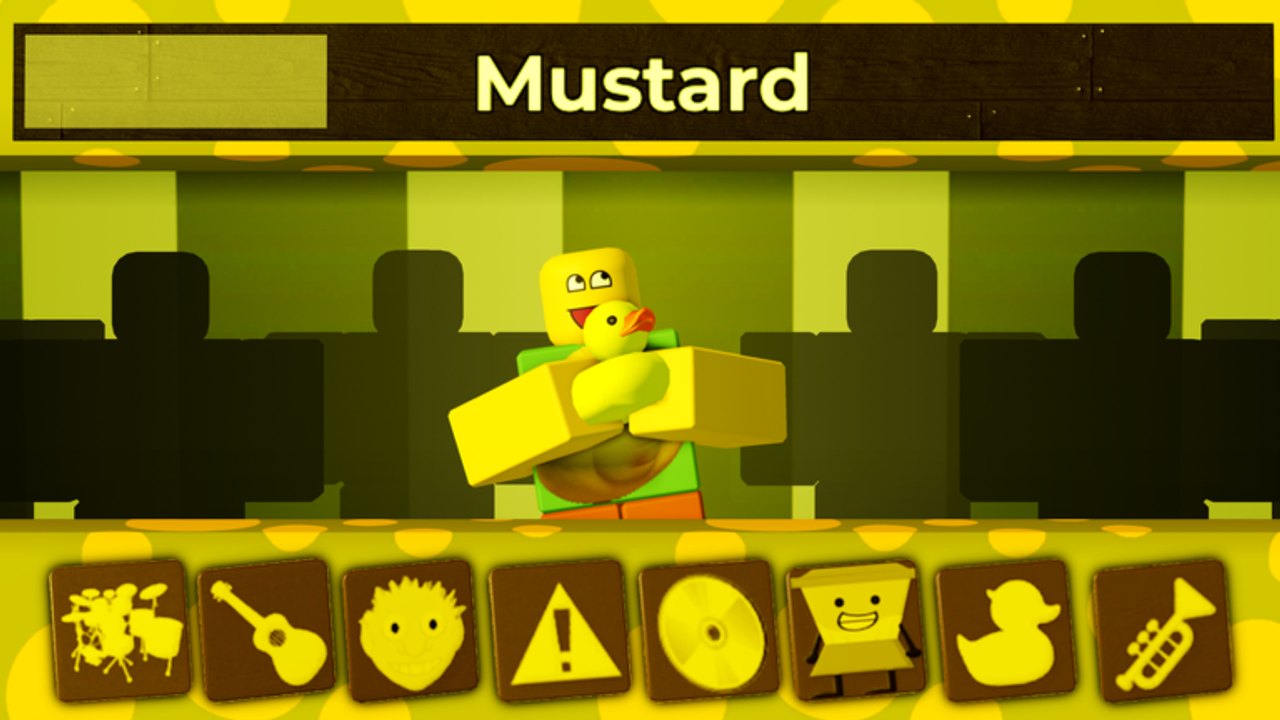
Incredible Blox does not open with a combat tutorial. You load the Roblox place, see a row of dummies, and a tray of instrument icons. The first session goes well when you treat that tray like a drum kit, not like a collection quest. This page is the join plan: platform, first mod, first two pads, then a clean handoff to the rest of the wiki.
Join the experience
Open Incredible Blox from Roblox on PC, mobile, console, or VR. The live place is 125790795579287, published by specil studios Deluxe, with blocco listed as the contact for original mod creators who want a set included or discussed. The experience is free. Optional Robux passes exist; you do not need them to hear a full loop on the default dummy rows.
Give the client a few seconds to stream the selected mod. If icons appear but audio does not, check Roblox volume and the experience mute before you assume a pad is broken. Console and VR players should confirm that a pointer or reticle can highlight an icon before they start dragging. If the cursor feels lost, the later controls guide is the fix — not a reinstall. Stay on one mod for the whole first session even if a clip you watched used a VIP costume your client has not loaded.
Pick a chill mod first
Kats and Mustard Colorbox are the kindest first loads: bright palettes, readable icons, and grooves that still work with a beat plus one melody. Planet Mountain Dew and Cool As Ice are fine once you can grab icons without dropping them on the floor.
Save 1996, Deadline, Somniphobia, and Terrors for later. They carry the mild fear and light-blood tags and teach the UI slowly because you are also watching for jumps. Sprunked, Orin Ayo, Yubin Niiku 2, Next, Fiddlebop, Pibble Mayhem, Zombie, Incredible 770, and Dip Out can wait until mute and solo feel automatic.
Drop two or three pads, then stop
Drag a beat icon onto an empty dummy. Listen for a full bar. Add a second icon from a different family — a percussion fill, a bass, or a short melody — and wait again. Add a third only if the loop still has air.
New mixers fill every dummy because the tray looks like a checklist. It is not. A three-pad mix that grooves is a successful first join. A twenty-pad wall of vocals is how you learn nothing about which icon did the damage.
If you misdrop, hover the dummy and remove that stem instead of resetting the whole row. Mute and solo exist for the same reason: isolate one dummy, decide if it belongs, then keep or cut it. You will use those hover actions for the rest of the game, including eight-player lobbies.
Expand only after the loop is stable
When those two or three parts lock, add one vocal or one effect, not both. If the new part fights the beat, solo the dummy, mute it, then remove it. That tiny diagnostic is the whole skill of Incredible Blox.
VIP / DJ at 200 Robux unlocks up to four dummy rows and instant-start instruments. Ignore extra rows on day one unless a friend already owns the pass and is hosting. Default rows are enough to learn timing and the difference between a mix and a pile. Rebuild a second loop from memory; if it is louder and worse, cut pads until you can name each dummy in one word: kick, snare, bass, lead, choir.
Optional purchases and codes
Three gamepasses sit on the Roblox store. Details live on the gamepasses page:
- User Instruments — 150 Robux, for dummy outfits and user-styled instrument looks
- VIP / DJ — 200 Robux, for up to four dummy rows and instant-start instruments
- Set Cursor Image — 85 Robux, so your pointer is readable when eight mixers overlap
None of them are required for a first mix. Buy later, after you know whether you want looks, rows, or a readable cursor.
No public promo-code list is confirmed. Do not sit in a redeem UI hunting a string the developers have not shipped. The codes hub is where we would publish one; until then, spend the session on pads.
After the first mix
Leave the chill mod loaded and open how to play while the sound is still in your head. Come back to this page only when you are teaching someone else their first join.
Use this ten-minute plan on a fresh account and on a friend’s account: join, load Mustard or Kats, drop a beat, drop a melody, listen to four bars, add one vocal, screenshot the row, leave. If the screenshot shows more than six occupied dummies, you overbuilt. Run the same plan tomorrow with one fewer pad. That screenshot is your beginner diploma — not a full-tray clear.
Frequently Asked Questions
Quick answers to the most common Incredible Blox questions.
Which platform should I join on first?
Whichever you already use for Roblox. PC mouse is the clearest teacher, but mobile touch, console, and VR all support the same drag-onto-dummy loop.
Should my first mod be Mustard or Kats?
Either. Both read clearly and stay musical with two or three pads. Avoid 1996, Deadline, Somniphobia, and Terrors until the UI feels automatic.
How many pads should I drop on the first mix?
Two, then maybe a third. Stop while you can still name every dummy. Filling the tray is how beginners lose the beat.
Do I need gamepasses on day one?
No. Default rows are enough. Read gamepasses only after you know whether you want outfits, extra rows, or a custom cursor.
Are there codes to redeem after I join?
No confirmed public codes. Check codes later if specil studios Deluxe posts one; do not stall your first mix waiting.
What should I read after this page?
Go to how to play next, then controls if an icon will not drop on your device.